Give every learner an AI interview coach, and see your whole cohort in one place
Learners practice real interview questions on video and get every answer scored. Your team sees who has started, who is improving, where the skill gaps are and who needs a follow-up, in one dashboard.
The Interview Skills Agent’s cohort view. Northvale University, its students and the employers shown are fictional examples.
The top choice for 22,000+ students at universities like these
Mock interviews conducted
5M+
Unique interview questions
50,000+
Feedback data points analysed
10M+
Improved user confidence
95%
Cohort intelligence
See whether your programme is working
The Interview Skills Agent turns every assessment into a cohort view: who is taking part, how far scores have moved since the first assessment, which levels learners have reached, where the skill gaps are and where learners drop off.
Cohort progress
Average score per week: is the programme working?
Jul 6Aug 3Aug 31Sep 21
Level distribution
How many learners sit at each level.
1
2
3
4
5
6
7
8
9
10
Skill strengths and gaps
Cohort focus: Creativity and problem-solving.
Creativity63
Problem-solving66
Teamwork and collaboration69
Adaptability and learning71
Communication72
Engagement
Where learners drop off.
Joined8 100%
First assessment7 88%
Second assessment7 88%
Level 4 or higher6 75%
Evidence-based scoring
Five skills: communication, teamwork and collaboration, creativity, problem-solving, and adaptability and learning. An answer earns credit for a skill only when it contains observable evidence of it.
First score against latest
Improvement for every learner and for the cohort since the first assessment, and the average week by week.
Where to put coaching time
The cohort’s strongest skills and largest gaps, its spread across levels 1 to 10, and the step where learners stop engaging.
Learner detail
Turn every assessment into a focused coaching conversation
Open any learner to see their level, their score trend, each skill against the cohort average, their improvement plan and the badges they have earned. Then go to the evidence: their interviews, with recordings, transcripts, answers, AI analysis and coaching feedback where available.
Current level and latest improvement
Skills compared with the cohort
Improvement plan and progress
Recordings, transcripts and feedback
AM
Ava Morgan
Northvale University
Level8
Latest score
82+18 since first
4 assessments completed
Skills against the cohort
Ava Cohort
Creativity75
Problem-solving79
Teamwork and collaboration83
Adaptability and learning81
Communication86
Improvement plan
2 of 3 actions done
Badges earned
AssessmentsRecordingsTranscriptsCoaching
Know who to follow up with first
Huru flags learners who have never started, have been inactive for a while, have not taken a follow-up assessment or whose progress has stalled. They are prompts for a conversation with a person, not judgements about a learner.
Needs attention
Learners to follow up with first
ECEthan ClarkeNever started
FAFatima AlviInactive 14+ days
NWNoah WilliamsInactive 14+ days
Interview debriefs
Open any student’s interview and see what a hiring manager would see
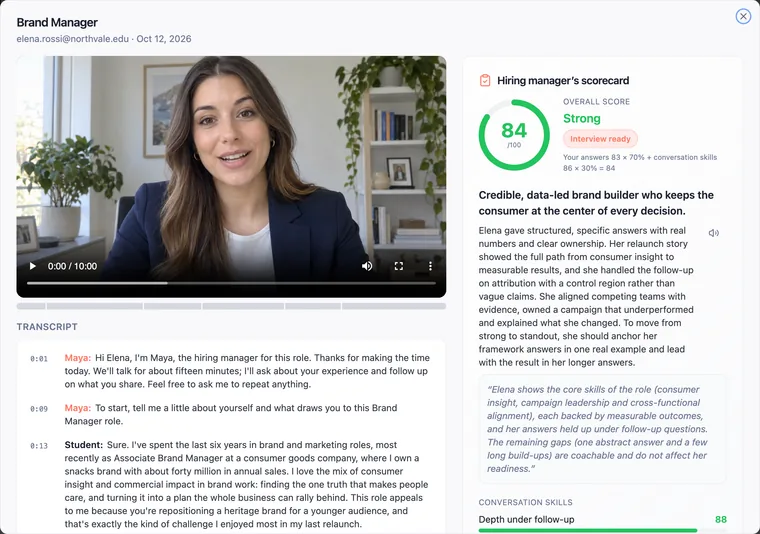
Your team sees the same debrief the student gets, for live interviews with the AI interviewer and for recorded question-by-question answers: the recording with a synced transcript, the hiring manager’s scorecard and verdict, and the evidence behind each score.
What your team opens: the recording, a synced transcript and the hiring manager’s scorecard.
Conversation skills: depth under follow-up, conciseness and pacing, composure, engagement and close
Talk time, pace, thinking time, filler words and ownership (“I” against “we”)
STAR completeness for each answer, consistency, and how much of the job description they covered
Presence on camera: eye contact, posture, expressions, energy, gestures and framing
Strengths, what to work on next, standout moments and stronger versions of weak answers
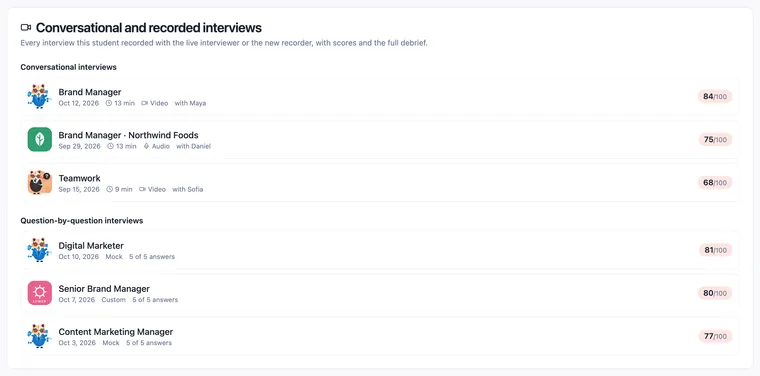
A score for every question, live or recorded
One student’s live and recorded interviews, with their scores.
Organization login address
Share this link so learners can join your organization
appv2.huru.ai/login/org/northvale
Learners who join through this link receive a 12-month licenceConfigure
Active7of 8 licences
Pending approval0Awaiting approval
Expired1Access ended
LearnerRenewalStatusExpires
Ava MorganAuto-renewActiveAug 31, 2027
Leo MartinAuto-renewActiveAug 31, 2027
Sofia ReyesAuto-renewActiveAug 31, 2027
Noah WilliamsAuto-cancelActiveAug 31, 2027
Fatima AlviAuto-cancelActiveAug 31, 2027
Ethan ClarkeEndedExpiredAug 31, 2026
Licences and access
Manage every learner’s access from one screen
See active, pending, expiring and expired licences and each learner’s renewal setting. Share one organization login address, set how long its licences last and whether they need approval, and choose auto-renew or auto-cancel per learner. When a licence expires, the learner’s organization access ends with it.
Buy it the way your institution buys
Talk to us
Tell us how many learners you have and what you need, and we set it up for you.
Per licence
Grant licences from organization credits, at the rate and duration agreed for your organization.
Contract
Huru opens access for an agreed date range and a maximum number of learners.
With their Microsoft school account, from their course in your LMS, or from a link on your own portal. Nobody needs another password, and a new student gets a license the same way as on your login page: from your credits or a seat in your contract, or after your approval.
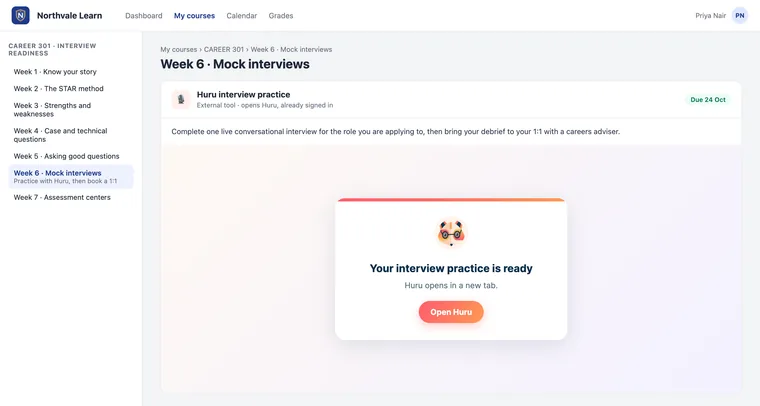
A careers course in the LMS, with Huru added as an external tool.
Sign in with Microsoft
Students use their school or work Microsoft 365 account. You connect your Microsoft organization once, with no code, and if your tenant requires admin approval, your IT team approves Huru for everyone with one link.
Moodle, Canvas, Blackboard and Brightspace
Your LMS administrator adds Huru as an external tool through LTI 1.3, with step-by-step setup for each platform. Interview practice then opens from inside the course.
Your own portal
Put a link or button on your student portal, intranet or careers site. Your server signs each link, which works once and for five minutes at most. Huru gives you code to copy for Node.js, Python and PHP, and a tester that checks a token without signing anyone in.
Only addresses on your organization’s email domains can sign in, and each sign-in is logged, refused attempts included. Single sign-on is turned on per organization: ask for it in your settings.
Practice button for job pages
Turn every job posting into a mock interview
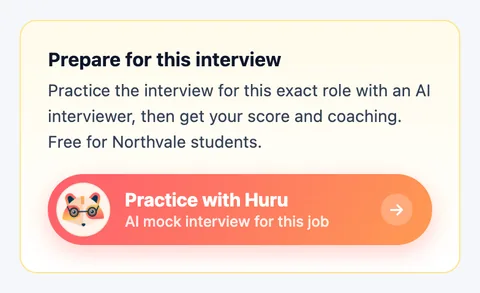
Paste one snippet on your job pages. Each posting gets a “Practice with Huru” button, and one click builds a mock interview from that exact job, as a live conversation or question by question. There is nothing to set up per job: the button reads the title, company, location and description from the page.
For university job boards
Students rehearse for the role they are about to apply for, straight from your career center’s listings.
For employers’ careers pages
Candidates prepare right next to “Apply now”, so they arrive at the interview ready.
Fits your site
Pick the style (coral, navy or light), the size and the language. It works on most job pages, including sites built with Webflow, Framer, WordPress or your own code.
One click to start
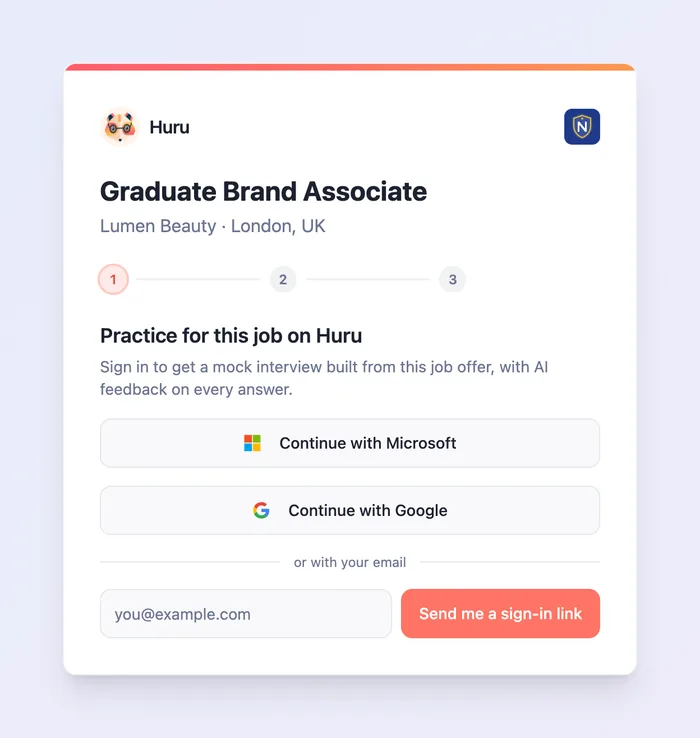
People sign in with Microsoft, Google or their email address, and their interview is waiting.
The button on a university career center’s job board.
Where it leads: the job, three steps and a quick sign-in.
See what each posting leads to
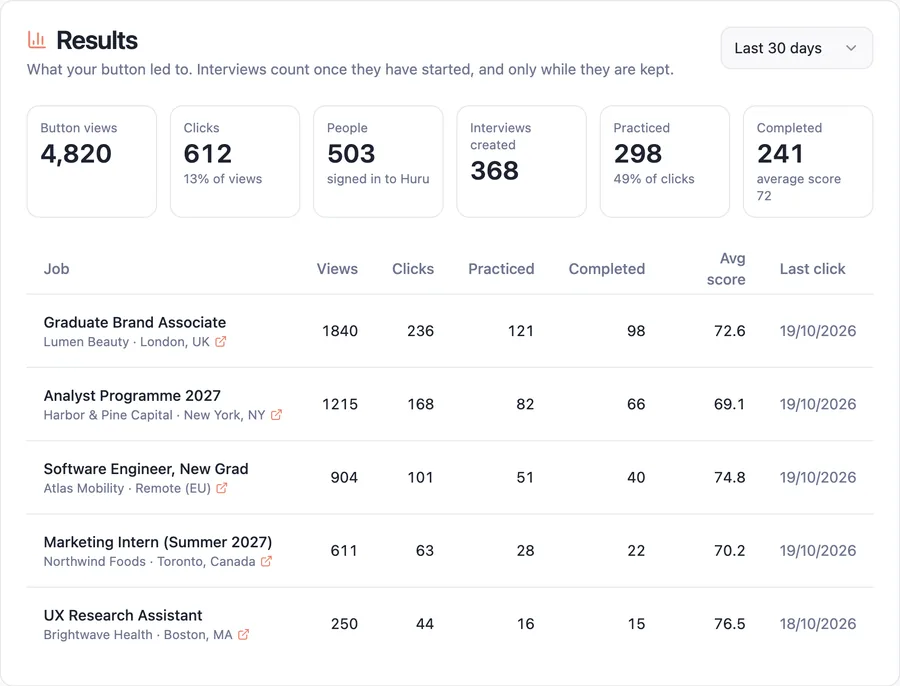
Views, clicks, people who signed in, interviews created, practiced and completed, and the average score, job by job.
Results per job page over the last 30 days.
AI assistants
Ask about your cohort in Claude, ChatGPT or Microsoft 365 Copilot
Connect Huru to the AI assistant your team already uses, then ask in plain language. Get answers, charts and reports built from your organization’s Huru data, without exporting a spreadsheet.
Questions you can ask
“How many learners do we have, and how many are actively practicing?”
“Show a chart of learners by level and by score.”
“Which learners need help this week, and why?”
“Give me a monthly report for leadership with charts.”
“Compare first and latest assessment results across the cohort.”
Your AI assistant
Huru connected, read-only
Which learners need help this week, and why?
Read Huru: needs attention, activity
Three students at Northvale University need a follow-up:
Ethan Clarke has not started an assessment yet.
Fatima Alvi has been inactive for 14+ days, after moving from 59 to 69.
Noah Williams has been inactive for 14+ days, after moving from 52 to 63.
Show a chart of learners by level.
Read Huru: levels
L3
L4
L5
L6
L7
L8
Most learners are at level 5; the range runs from 3 to 8.
Ask about your cohort…
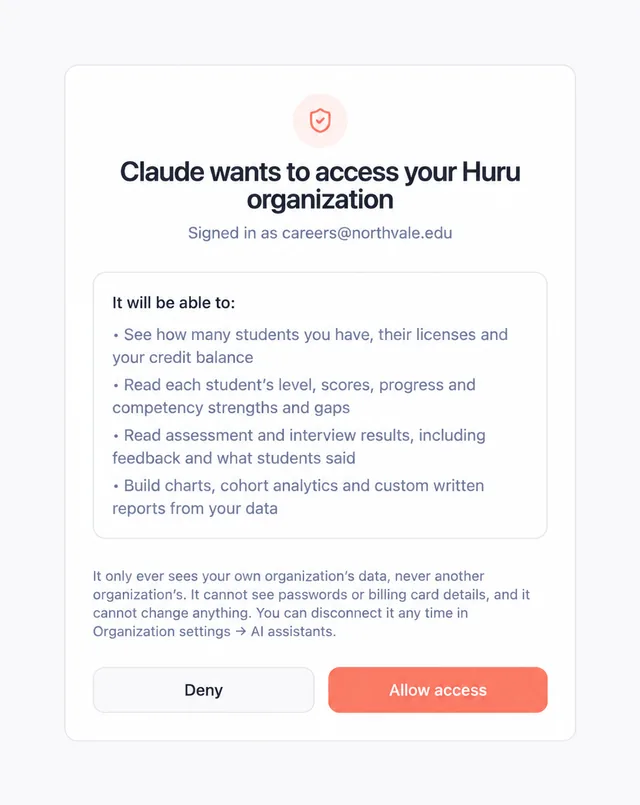
What an administrator approves when connecting an assistant: read-only access to your organization’s data.
Read-only, logged and in your control
Signed in with OAuth
An authorized administrator signs in and grants access.
Your organization only
The connection sees your organization’s data and nothing else.
Read-only
It cannot change learner data or act on a learner’s behalf.
Logged
Every assistant request is recorded in an activity log.
Revocable
Disconnect it at any time.
IT-friendly
Microsoft 365 Copilot availability may depend on your IT permissions.
Reports, branding and roles
Everything your programme team needs around it
Reports in a click
Export the cohort to CSV, print a progress report, or filter by period and learner group. A connected AI assistant can draft the summary for you.
“Create a monthly report showing participation, average improvement, level distribution, top skill gaps and learners needing follow-up.”
Your brand at the door
Learners sign in through your own login address, with your logo and brand colour. Preview the page before you share it. Logos can be PNG, JPG or SVG, up to 5 MB.
Logo
NPNG, JPG or SVG, up to 5 MB
Primary colour
#1E3A8A
N
Northvale University
Sign in to start practicing
Sign in with Microsoftoryou@northvale.eduContinue
Roles and privacy
Owners control settings, members and billing; admins get the permissions you assign; members get learner access. Data stays scoped to your organization, and AI assistant access is read-only and logged.
Owner
Organization, settings, members and billing
Admin
The management permissions you assign
Member
Learner-level access to the programme
For your learners
What your learners practice with
The same Huru that job seekers use on their own, with your organization’s access behind it.
Live AI interviewer
A spoken interview with follow-up questions, by video or audio only, then a debrief that reads like a hiring manager’s notes.
Mock interviews for 242+ roles
In 29 categories, plus custom interviews built from any job title and description.
Practice on video
Question by question on camera, on a computer or a phone, with every answer ready to watch back.
Feedback on every answer
Scored out of 100 on relevance, structure, specificity, impact and articulation, with what worked, what to fix and a stronger version.
Interview Skills Agent
Five core skills, ten levels, badges that stay earned and a personal practice plan.
AI resume builder
A tailored resume for each job, scored for ATS, recruiter and career fit, without inventing experience.
Five languages, every device
English, Spanish, Portuguese, German and French, on the web, iOS and Chrome.
No new password
Students arrive from their course or your portal, or sign in with Microsoft.
We believe that access to elite interview coaching shouldn’t be a privilege. Our mission is to use the power of AI to provide personalized, data-driven preparation for every job seeker, regardless of their background or network. We’re committed to building a world where every candidate can walk into their interview feeling prepared, confident, and ready to succeed.
Our vision
Shaping the future of career readiness.
Our vision is a future where the hiring process is more equitable and every individual has the tools to showcase their true potential. We see a world where organizations can confidently put forth candidates who are not just skilled, but also polished, articulate, and prepared for the moments that define their careers. It’s a future where technology doesn’t just assess talent—it helps build it.
Our approach
AI built to empower, not just assess.
Our core belief is that technology should serve human potential. That’s why our ethical AI is designed as a supportive coach, not a gatekeeper. It focuses on providing private, constructive feedback to help individuals grow. We are deeply committed to data privacy and using technology in a way that builds confidence and creates opportunity for everyone.
Questions from programme teams
What is Huru for Organizations?
An AI interview coaching platform for universities, career services teams, training providers, bootcamps, workforce programmes and employers. Learners practice interviews on video and get every answer scored; your team manages their access and sees participation, improvement, skill gaps and who needs a follow-up in one dashboard.
What does the Interview Skills Agent measure?
Five core skills: communication, teamwork and collaboration, creativity, problem-solving, and adaptability and learning. Scoring is evidence-based: an answer must contain observable evidence of a skill before it earns credit for it. Learners move through ten levels, so it also works as a soft skills and career readiness assessment you can repeat over a programme.
Can staff review an individual learner’s interviews?
Yes, for learners with an active licence. Depending on the interview and your permissions, you can review completed practice interviews, recorded answers, transcripts, AI analysis and coaching feedback, scores and areas to improve.
How is Huru priced for organizations?
Pricing is set for each organization. There are three arrangements: you tell us your learner numbers and needs and we set it up; you grant licences from organization credits at your agreed rate and duration; or Huru opens access for an agreed date range and maximum number of learners.
Can we connect Huru to ChatGPT, Claude or Microsoft 365 Copilot?
Yes. An authorized administrator connects through OAuth, and the assistant can then answer questions and build charts and reports from your organization’s data. The connection is read-only, limited to your organization, logged and revocable. Microsoft 365 Copilot availability may depend on your IT permissions.
Can learners sign in through our own branded page?
Yes. Each organization has a dedicated login address, and you can add your logo (PNG, JPG or SVG up to 5 MB) and primary brand colour, with a preview before you share it.
What happens when a learner’s licence expires?
Their organization access ends, so expired learners do not keep organization benefits. You can set each licence to renew automatically or to cancel at the end of its term.
Who can see our organization’s data?
Only people in your organization, according to their role: owners, admins with the permissions you assign, and members with learner-level access. Data is scoped to your organization, and AI assistant access is read-only and recorded in an activity log.
Does Huru integrate with Moodle, Canvas, Blackboard or Brightspace?
Yes, through LTI 1.3. Your LMS administrator adds Huru as an external tool, following the setup steps Huru shows for each platform, and students open their interview practice from inside the course without signing in again. Single sign-on is enabled for each organization on request.
Can students sign in with their Microsoft school account?
Yes. Once your Microsoft organization is connected, students sign in with their school or work account, with no code to write. If your Microsoft tenant requires admin approval for new apps, your IT team approves Huru once for everyone. Signed links from your own portal are an alternative, with sample code for Node.js, Python and PHP.
Can we add interview practice to our job board or careers page?
Yes. Paste one snippet and every job posting gets a “Practice with Huru” button that builds a mock interview from that job, live or question by question. You choose its style, size and language, and you can follow views, clicks, interviews and average scores for each posting.
Do students get the live AI interviewer?
Yes. Students can talk through a spoken interview with a live AI interviewer that asks follow-up questions, by video or audio only, or answer questions one at a time on camera. Your team can open every debrief: the recording and transcript, the scorecard, conversation skills, STAR completeness and presence on camera.
How do we measure whether our interview program is working?
The cohort view compares every student’s first and latest assessment, plots the cohort average week by week and shows the spread across levels 1 to 10, the skill gaps and the step where students drop off. Huru also flags the students to check in with, and a connected AI assistant can turn the same data into a monthly report with charts.
Contact us
See Huru with your own programme in mind
Tell us about your learners and your goals. We will show you the dashboard, the Interview Skills Agent and the AI assistant connection, and help you choose the right arrangement.